Your background worker is failing silently, or your scheduled command is piling up on itself, and you're not sure which tool was wrong to begin with.
Both feel like "run something in the background." They are not the same thing.
Getting the distinction right means fewer silent failures, predictable retry behavior, and a codebase your future self can actually debug.
The core difference in one sentence
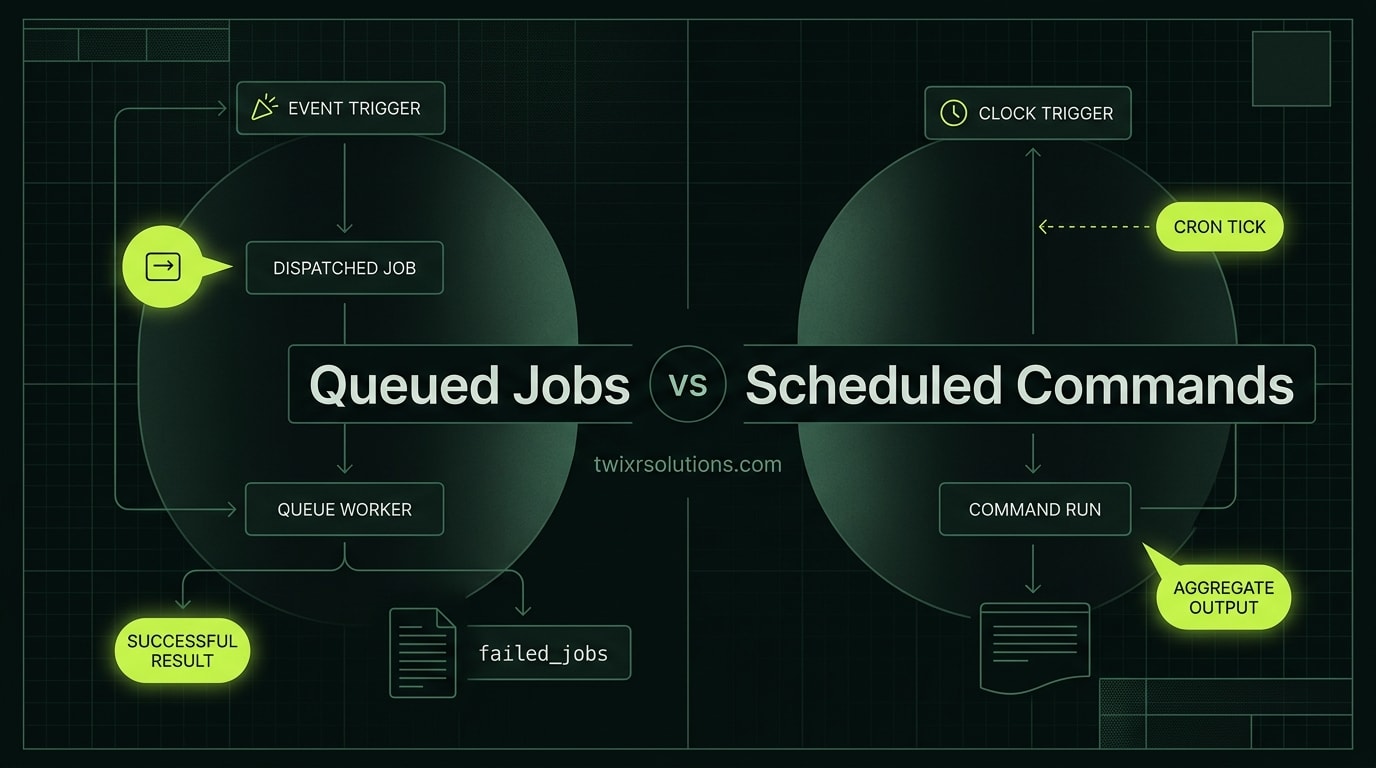
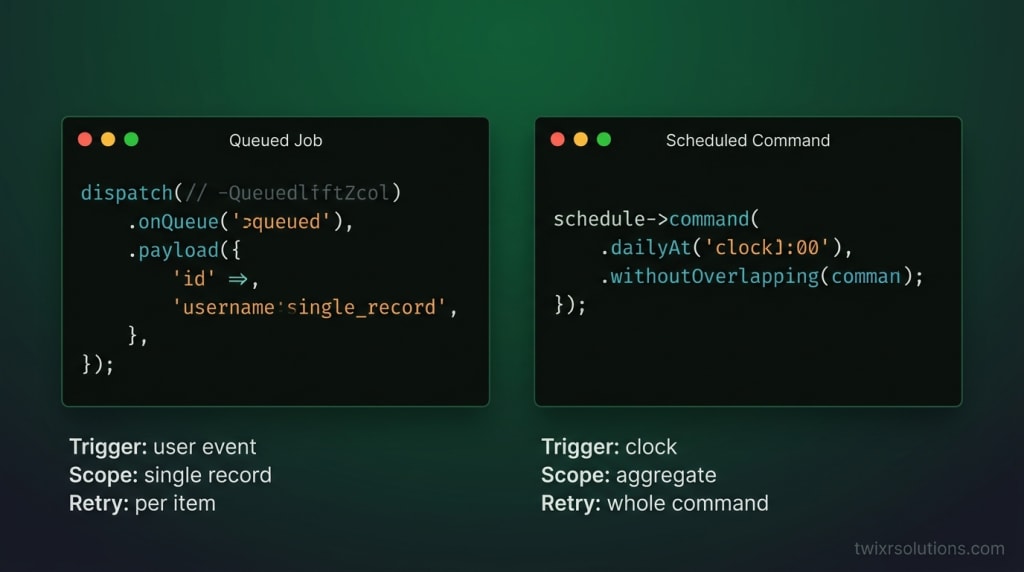
A queued job is triggered by an event - something happened, so process it now.
A scheduled command is triggered by the clock - it is time, so run this routine.
That sentence does most of the decision-making for you. The rest of this post fills in the edge cases.
When to use a queued job
Reach for dispatch(new SomeJob(...)) when:
- A user or external system caused the work. A new user registered, a webhook arrived, a payment was confirmed. The trigger is external and unpredictable.
- The work has a specific subject. Sending one welcome email, resizing one uploaded image, hitting one external API call for one record. Each job carries its own payload.
- Retries need to be scoped to a single unit of work. If sending a welcome email fails, you want to retry that one email, not restart a loop over every new user from the last five minutes.
- You need fan-out. Create 500 jobs in a loop from one trigger and let your queue workers chew through them in parallel. Scheduled commands can not parallelize the same way without significant extra wiring.
- Failure must be observable per item. Laravel's failed_jobs table records each job individually. You can see exactly which payload failed, when, and why.
A concrete shape
// Triggered in a controller or listener
ProcessInvoice::dispatch($invoice)
    ->onQueue('billing')
    ->delay(now()->addSeconds(5));
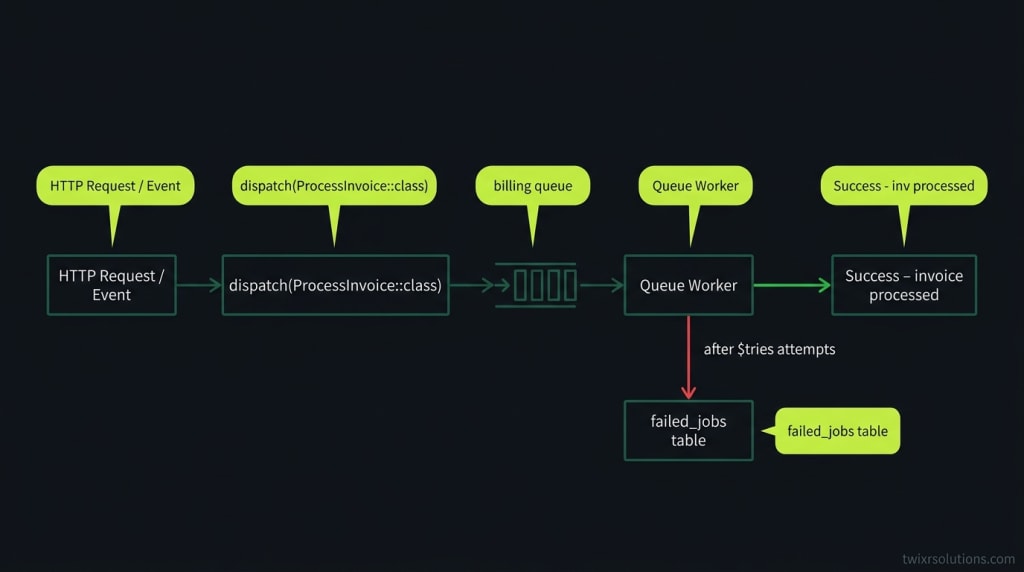
The job class holds the logic. The queue worker picks it up. If it throws, the job goes to failed_jobs after $tries attempts. No other invoice is affected.
When to use a scheduled command
Reach for $schedule->command(...) in app/Console/Kernel.php when:
- The trigger is time, not an event. Generate the daily revenue report at 02:00. Clean up soft-deleted records every Sunday. Send a weekly digest on Monday morning.
- The work is aggregate or systemic. You're iterating over a set of records that exist right now, not reacting to one that just arrived.
- There is no meaningful per-item retry. If the digest fails, you re-run the whole digest, not individual rows.
- You want rate control with no queue infrastructure. Small apps, simple CRON intervals, no Redis needed.
php artisan schedule:runfrom a single CRON entry is all you need. - The job has no natural "subject." Pruning old sessions, refreshing a cache, syncing an external report - there is no single model instance to hand a payload to.
A concrete shape
// In App\Console\Kernel::schedule()
$schedule->command('reports:generate-daily')
    ->dailyAt('02:00')
    ->withoutOverlapping()
    ->runInBackground();
withoutOverlapping() is non-optional for anything longer than a few seconds. Without it, a slow run and the next scheduled tick will both be alive at once, and you get a race condition or duplicate data.
The hybrid pattern - and when to use it
These two tools compose well. The scheduled command orchestrates; jobs do the work.
Pattern: every hour, a scheduled command queries for records needing processing, then dispatches one job per record.
// In the scheduled command's handle()
User::where('trial_ends_at', '<', now())
    ->whereNull('notified_at')
    ->each(fn($user) => SendTrialExpiryNotice::dispatch($user));
This gives you:
- Clock-driven scheduling (no missed records, predictable start time)
- Per-item retry via the queue (one failed email does not block the others)
- Observable failures in failed_jobs per user
This is the right shape for most SaaS billing flows, digest emails, and data-sync pipelines.
Common mistakes and what they cost you
Using a scheduled command for event-driven work
Someone submits a form. You want to send a confirmation email. You think: "I'll batch those every minute with a scheduled command."
Result: up to 60 seconds of latency for the user, a loop that grows in size with traffic, and a single failure that potentially rolls back the entire batch.
Use a queued job. Dispatch it from the controller.
Using a queued job for purely time-triggered work
You want to generate a monthly invoice PDF for every customer. You dispatch one fat job with no payload that loops over all customers internally.
If it fails midway, you have no idea where it stopped. The retry restarts from the top and risks duplicates.
Either use a scheduled command that you design to be idempotent, or use the hybrid: scheduled command dispatches one job per customer with the customer ID as payload, so each retry is scoped.
Forgetting withoutOverlapping() on slow scheduled commands
A command that imports an external CSV and takes 4 minutes will run twice if your CRON interval is 5 minutes and one run is slow. Add withoutOverlapping(). It creates a mutex via the cache driver. No external lock server needed.
Not setting a queue on jobs that matter
By default, all jobs go to the default queue. If your app sends emails, generates PDFs, hits external APIs, and imports files all on the same queue, a single slow import blocks every email.
Use named queues. Run separate worker processes per queue. Keep billing and email queues away from imports.
ProcessCsvImport::dispatch($file)->onQueue('imports');
SendWelcomeEmail::dispatch($user)->onQueue('email');
Decision tree (reference this when the next ticket lands)
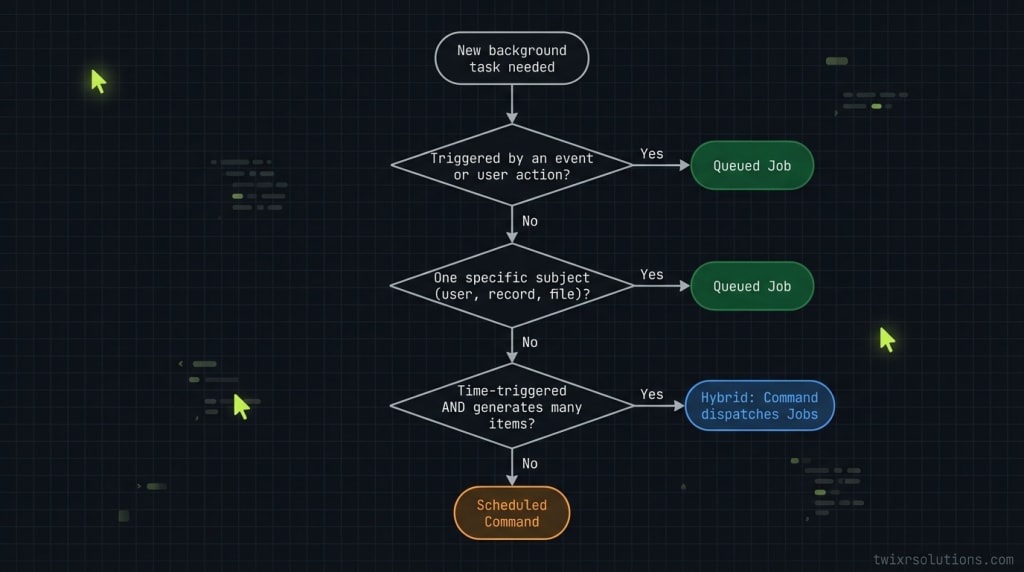
- Did a user action or external event trigger this work? Queued job.
- Is the trigger purely time-based? Scheduled command.
- Is there one subject (one user, one invoice, one image)? Queued job.
- Is the work aggregate (all users, all invoices from last week)? Scheduled command.
- Do you need per-item retries with full observability? Queued job.
- Is time-triggered work generating many per-item units? Both - command dispatches jobs.
Infrastructure notes worth keeping in mind
Queue driver matters. For anything production-grade, use Redis or SQS. The database driver works but adds load to your primary DB under traffic. The sync driver runs jobs synchronously - fine for local dev, not for production.
Horizon is the right dashboard for Redis queues. It gives you throughput metrics, failed job inspection, and per-queue worker balancing from a single UI. If you're on Redis and not running Horizon, you're flying blind.
Scheduled commands still need a process manager. php artisan schedule:run must fire every minute via a system CRON. On ECS or Fargate, run a dedicated scheduler task with the container command set to php artisan schedule:work. Do not rely on the same container that serves HTTP.
What this looks like in practice
On a SaaS project I built on AWS ECS, the queue architecture ended up with four named queues: default, email, billing, and imports. The scheduler ran as a separate Fargate task. Scheduled commands handled nightly reports, cache warming, and trial expiry checks. All the actual per-user work got dispatched as jobs so failures were scoped and retryable.
The distinction is not subtle once you've been bitten by a 4-minute command blocking welcome emails. Name the trigger, name the subject, pick the right tool.
Which part of this trips you up most on a new project - queue driver choice, naming queues, or deciding the hybrid boundary?
Frequently asked questions
A queued job is triggered by an event - a user action, a webhook, something that just happened. A scheduled command is triggered by the clock - it runs at a defined interval regardless of what the application is doing. The trigger type is the primary deciding factor.
Yes, and this hybrid pattern is often the right call. A scheduled command runs at a fixed time, queries for records that need processing, and dispatches one queued job per record. This gives you clock-driven scheduling plus per-item retries and observable failures.
withoutOverlapping() creates a mutex using Laravel's cache driver so that a second instance of the command cannot start while a previous instance is still running. You need it on any command that could run longer than its scheduled interval - otherwise you risk two instances running simultaneously and corrupting data or doubling work.
Use named queues in production. If all jobs share the default queue, a slow import job blocks email jobs queued behind it. Separate billing, email, and import work onto distinct queues and run dedicated workers per queue so a slow category does not stall the others.
Use Redis or Amazon SQS for production. The database driver works but adds write load to your primary database under traffic spikes. The sync driver runs jobs inline and is only appropriate for local development.
Enjoyed this article?
Get notified when I publish new posts on SaaS, Laravel, and remote engineering.