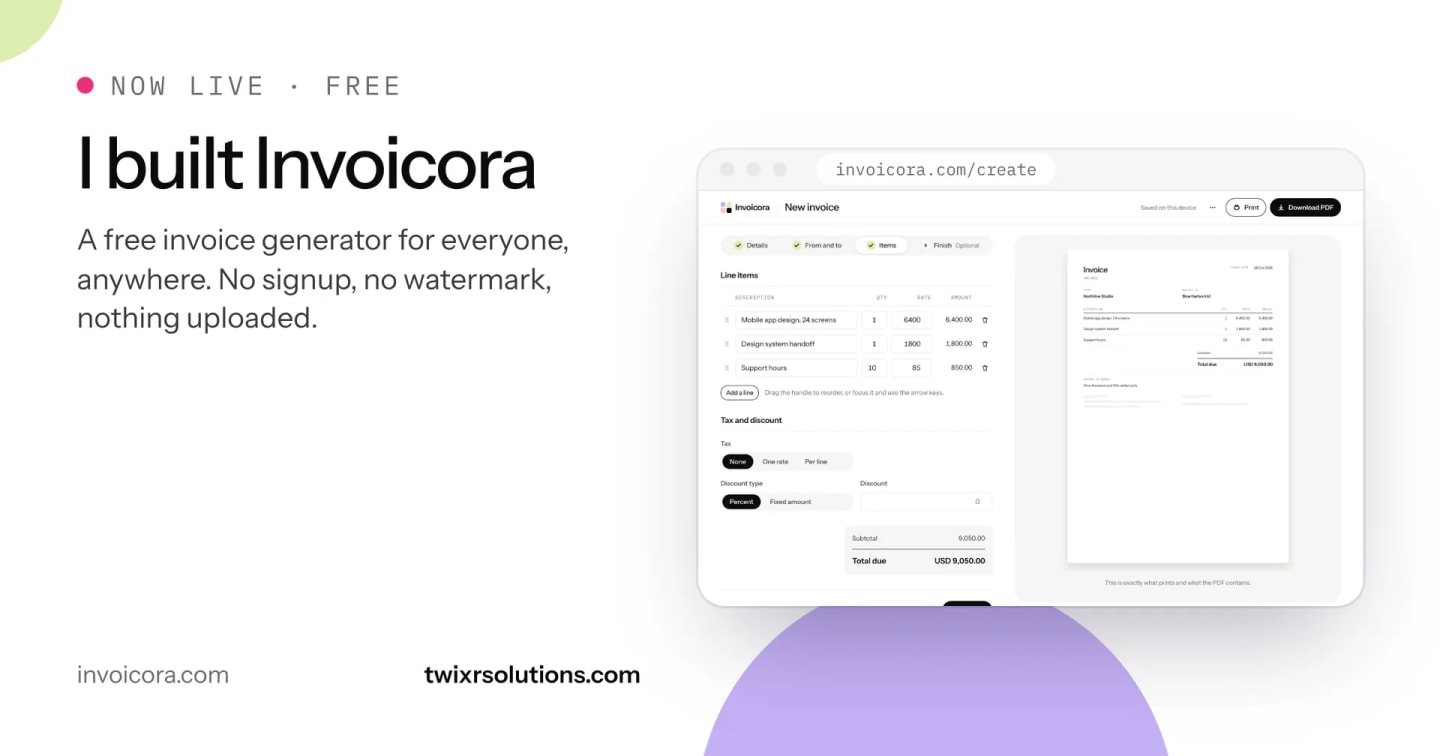
I built a free invoice generator, and it is now live for everyone at invoicora.com. You can open it, make an invoice, quotation or receipt, and download a clean PDF in about a minute. There is no account to create, no watermark on your PDF and no limit on how many documents you make.

Why I built it
Every free invoice tool I tried had a catch. You fill in every field, press download, and then meet a signup wall, a watermark across your logo, or a cap on how many invoices you can make. Any tool that needs an account also keeps your client names and prices on its servers. And most assume one language and one simple tax line, which works until your client needs something else.
Freelancers and small businesses deserve better than that, so I built the tool I wanted to use myself and made it free for anyone.
What you can do with it
-
Make any common business document: invoices, tax invoices, quotations, proforma invoices, receipts and credit notes.
-
Use it from anywhere: choose your currency, name your own tax and set your own rate, or leave tax off entirely. US dollars, euros, pounds and other common currencies are built in, each with the right number of decimals.
-
Work in your language: the interface is in English, Arabic and Indonesian, and a bilingual mode prints Arabic and English labels side by side with one set of figures.
-
Follow local rules where they apply: optional country presets for the UAE, Saudi Arabia, Pakistan and Indonesia set the tax name, the rates and the required fields, and every rate links to the authority that published it.
-
Make it look like yours: ten templates, accent colours, your logo, a signature and a stamp.
-
Turn a quote into an invoice: duplicate an accepted quotation and switch the document type, and every line and total carries over.
-
Download or print: a clean PDF with the amount written out in words.
Make your first invoice in a minute
-
Open invoicora.com and click Create invoice.
-
On Details, pick the document type, your currency and, if you want local rules, your country.
-
On From and to, add your business and your client. Save them once and they are ready next time.
-
On Items, add each line with a quantity and a rate. Tax and totals are worked out as you type.
-
On Finish, choose a template, add notes or payment details, then click Download PDF.
What you see in the preview is exactly what prints and what the PDF contains.
Your data stays on your device
Invoicora has no backend. The site is a fully static Next.js export, and everything you type, including saved businesses and clients, lives in your own browser's storage on your device. Nothing is uploaded, because there is no server to upload it to.
That means privacy is part of how the tool works, not a promise in a policy. It also keeps running costs close to zero, which is why it can be free for everyone.
Built with care where it matters
-
Money is always an integer. Every amount is stored in minor units, such as cents or pence, so totals, discounts and tax never pick up floating point rounding errors.
-
Languages are designed, not bolted on. Right to left layouts use proper logical CSS, Arabic stays selectable text in the PDF, and the amount in words follows each language's own grammar.
-
Tax rules come with sources. Where Invoicora states a rate or a required field, it is written once, with the official source and the date it was last checked. Without a country preset, it claims nothing: the tax label and rate are yours.

What is next
More country presets, downloadable Word and Excel templates, and a steady stream of guides on the questions people ask about invoices, quotations and tax. If something is missing for the way you invoice, I would like to hear about it.
Try it
Invoicora is free and open to everyone at invoicora.com. No signup, no watermark, nothing uploaded.
Invoicora is one of the products we build at Twixr Solutions. If your business needs software built around the way you actually work, wherever you are, that is the kind of work we do.
Frequently asked questions
Invoicora is a free online invoice generator. You can make invoices, quotations, receipts and credit notes in your browser and download them as a PDF.
Yes. There is no signup, no watermark and no usage limit on the invoice generator.
Yes. Pick your currency, name your own tax and set your own rate, or leave tax off. Optional presets for the UAE, Saudi Arabia, Pakistan and Indonesia add stricter local rules where a country needs them.
In your own browser, on your device. Nothing is uploaded, because the site has no server or database.
No. Where a country requires invoices to be reported to a government system, such as ZATCA Phase 2 in Saudi Arabia or FBR integration in Pakistan, businesses that must integrate still need to. Invoicora creates the document; it does not connect to those systems.
English, Arabic and Indonesian, with Arabic and English together on one invoice in bilingual mode.
Enjoyed this article?
Get notified when I publish new posts on SaaS, Laravel, and remote engineering.